Shopify · Looked After

Setting up Looked After
Looked After: Returns & Claims is a Shopify app by FlexiLay for the part of selling that starts after delivery. Buyers ask for a Return, an Exchange or a Warranty Claim from their order, attach photos, answer your questions, and talk to you in one logged thread. You approve, send instructions, ship replacements and resolve from the app; every refund is made through Shopify so your reports stay right. It works for every order on the store, not only lay-by ones.
What's where
| Tab | What you do there |
|---|---|
| Overview | Today's numbers, the cases waiting on you, and the setup checklist with the next step highlighted. |
| Cases | Every case with filters: waiting on you, waiting on the customer, flagged, by status, by assignee, and search by reference, order, email or name. |
| Case | Items, answers, photos, the conversation, and a Next Step card that explains what each action does before you take it. |
| Rules | Presets (Strict, Standard, Generous), windows, who pays postage, restocking fee, automatic approval, and the return address and instructions buyers receive. |
| Settings | Your Returns Page (logo, colour, policy links, consumer-law wording), Questions for buyers, Team & notifications, Connection & help. |
| Account | Your plan and trial, cases used this month, the plan cards to upgrade or downgrade, and billing. |
Install, approve your plan, open the app
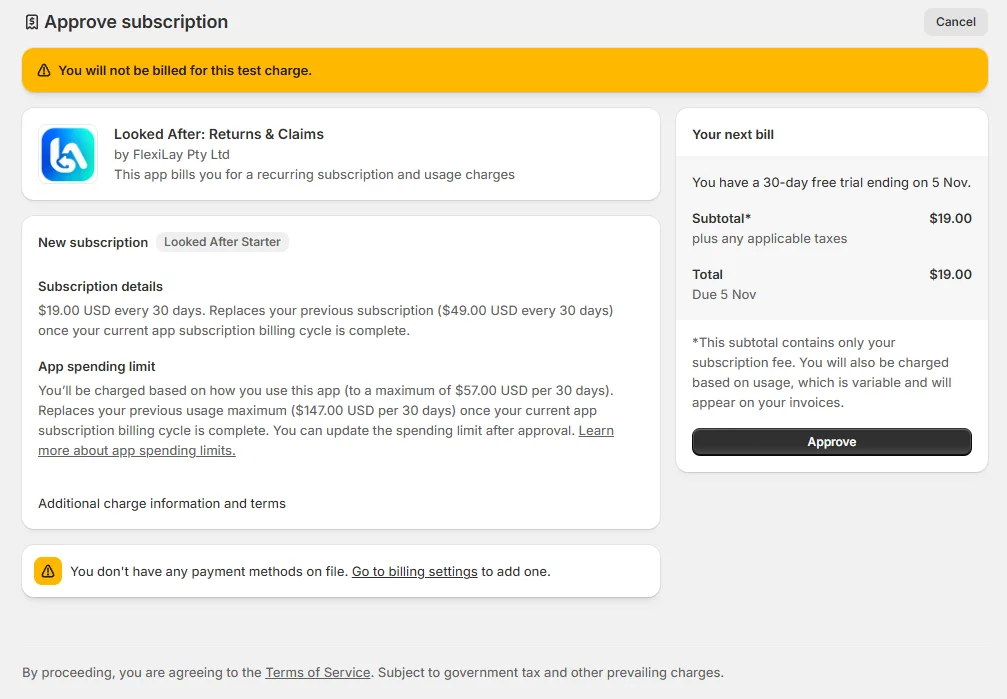
Install Looked After from its Shopify listing (or the install link FlexiLay sent you). Right after install Shopify shows you the Starter plan to approve, with a 30-day free trial: nothing is charged until the trial ends, and you can change or cancel at any time from the Account tab. Approve it and you land in the app (the screen is shown under Plans & billing).
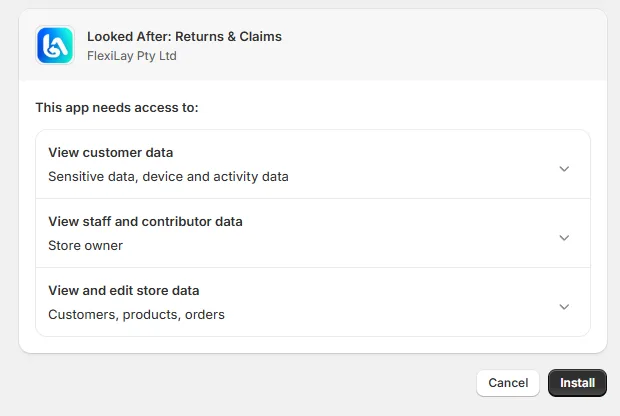
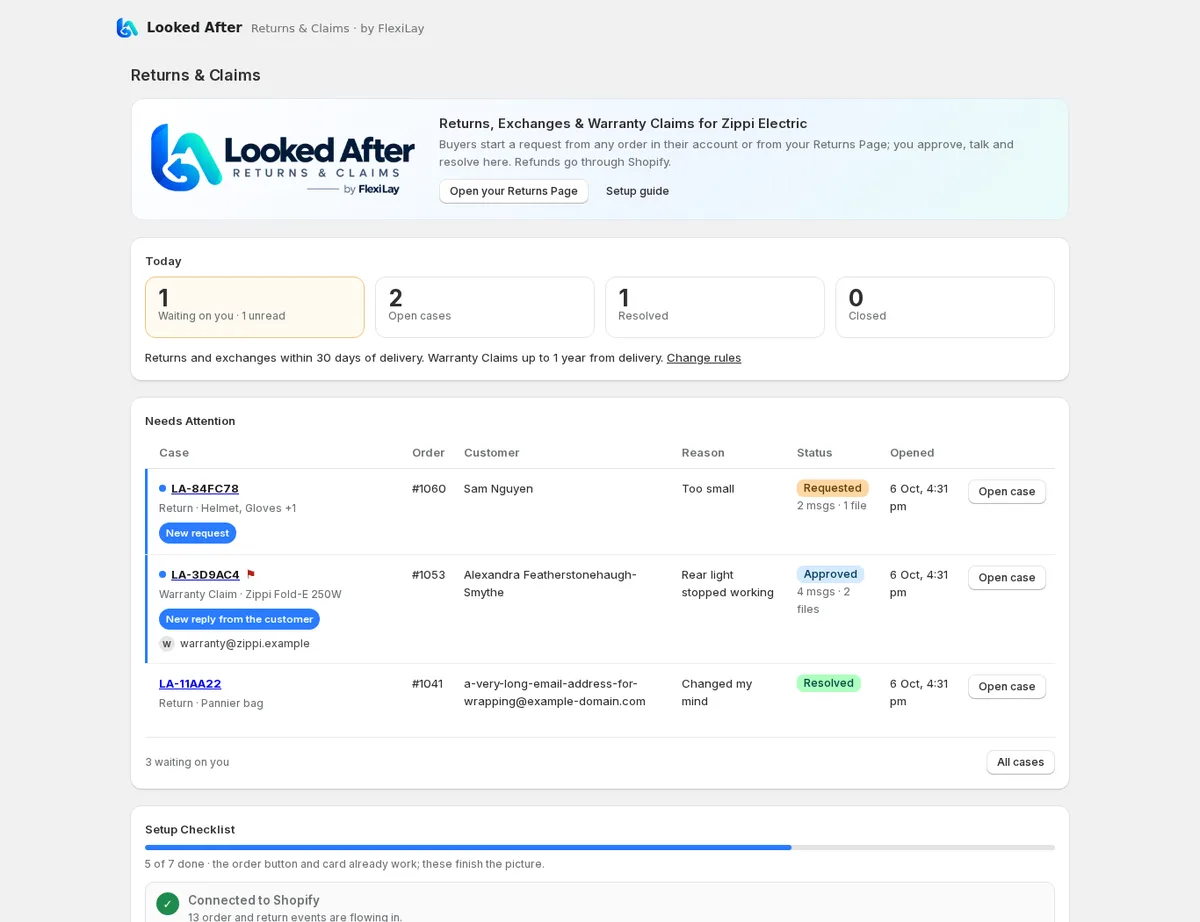
On first open the app registers the order, return and refund events it listens to and shows the Overview with a setup checklist. Two buyer surfaces are ready to place in customer accounts (step 4):
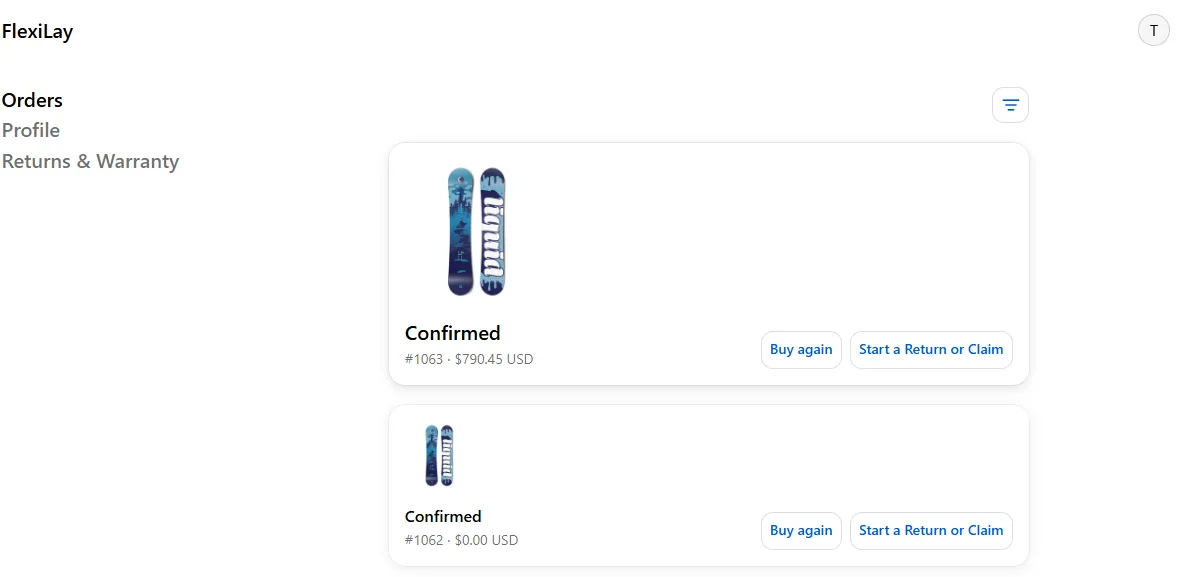
- A Start a Return or Claim button beside “Buy again” on every order.
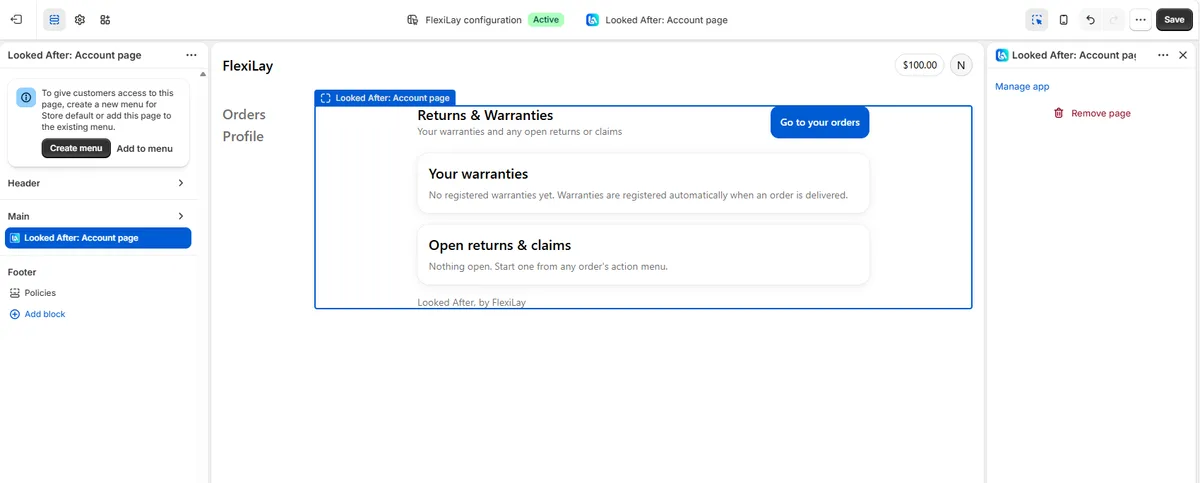
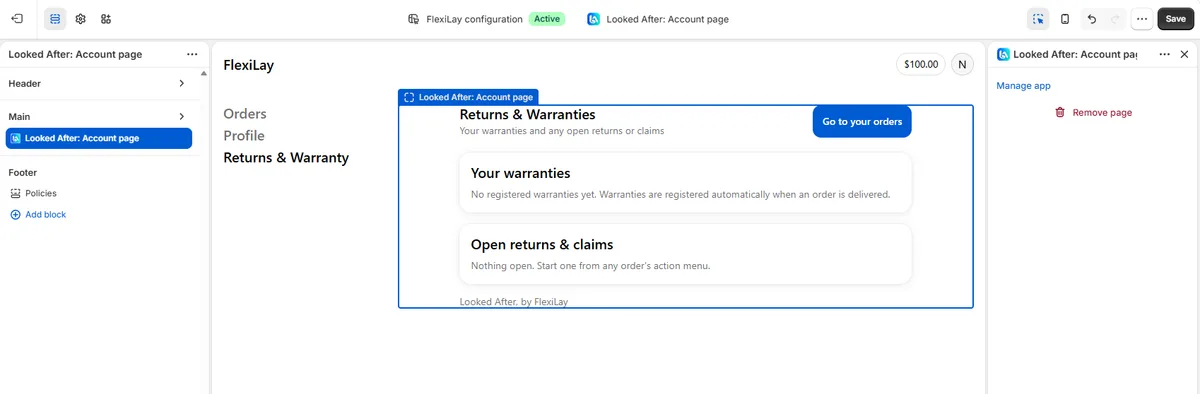
- A Returns & Warranties page listing the buyer's cases and warranties.
Already on FlexiLay Payments? Stores running the FlexiLay lay-by gateway get the Growth plan included at no charge for as long as the gateway is active. You won't be asked to approve a subscription; the Account tab shows “Included with FlexiLay”.
Customer accounts not switched on? Buyers still have your Returns Page (step 5). Nothing in Looked After requires accounts.
Set your rules
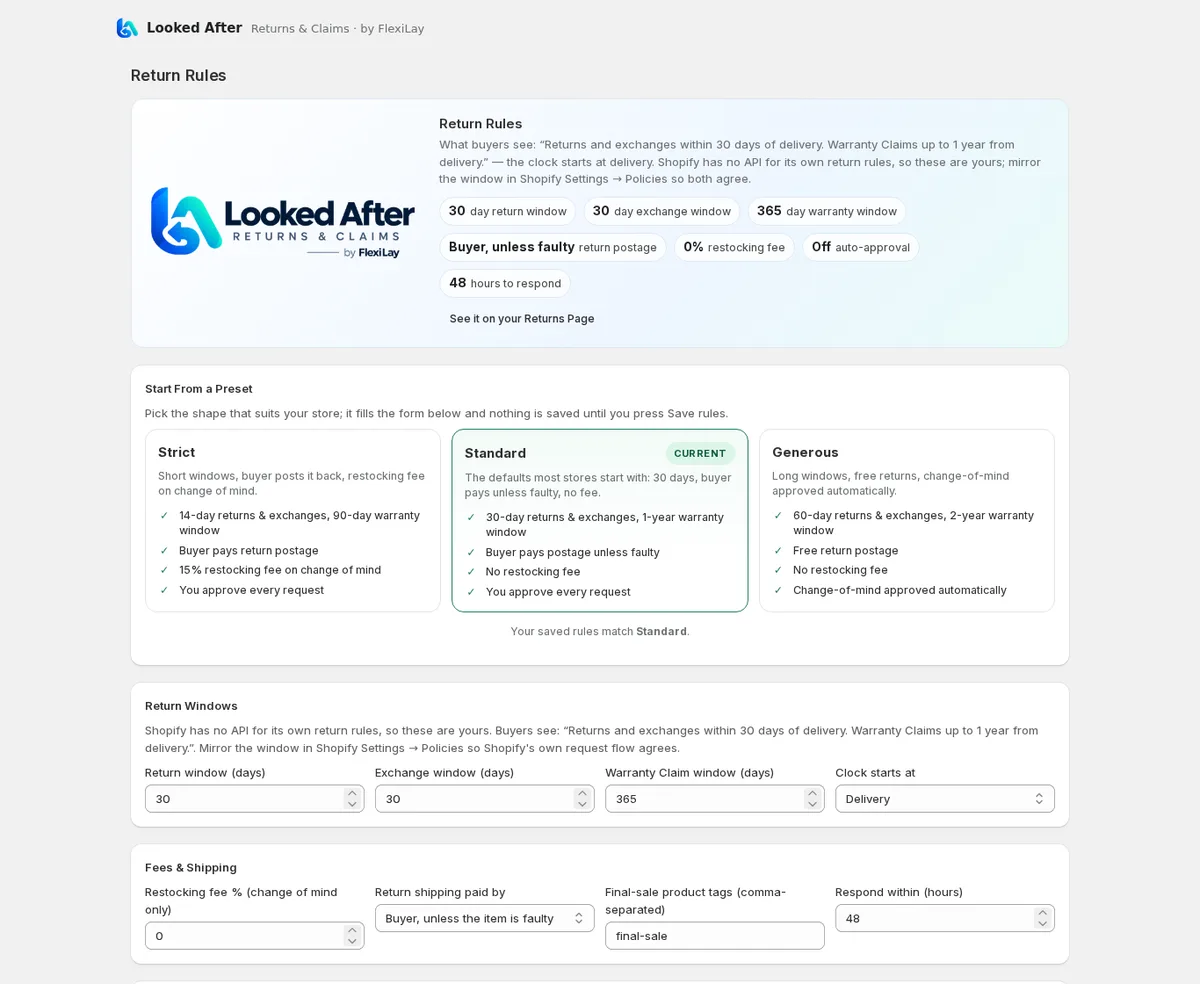
Open Rules. Shopify has no API for its own return rules, so these are the app's. Start from a preset, then adjust:
- Strict — 14-day returns and exchanges, 90-day warranty window, buyer pays return postage, 15% restocking fee on change of mind.
- Standard (recommended) — 30 days, one-year warranty window, buyer pays postage unless the item is faulty, no fee.
- Generous — 60 days, two-year warranty window, free returns, change-of-mind requests approved automatically.
A preset only fills the form; nothing changes until you press Save rules. The card marked Current is the one your saved rules match. Below the presets you can set each value yourself:
- Windows in days for Returns, Exchanges and Warranty Claims, and when the clock starts: delivery, dispatch, order date, or the day a lay-by or pre-order is released.
- Fees & shipping: who pays return postage, a restocking fee that applies to change-of-mind returns only (never to faults), product tags that mean final sale, and how fast you promise to respond.
- Automatic approval: plain change-of-mind Returns and Exchanges inside the window can be approved the moment they arrive, optionally only under an order value you set. Faults, anything outside the window and frequent returners always come to you first. Nothing is ever declined automatically.
- Sending items back: the return address (filled from your Shopify store address) and the instructions buyers receive. The wording follows your “who pays postage” choice unless you write your own.
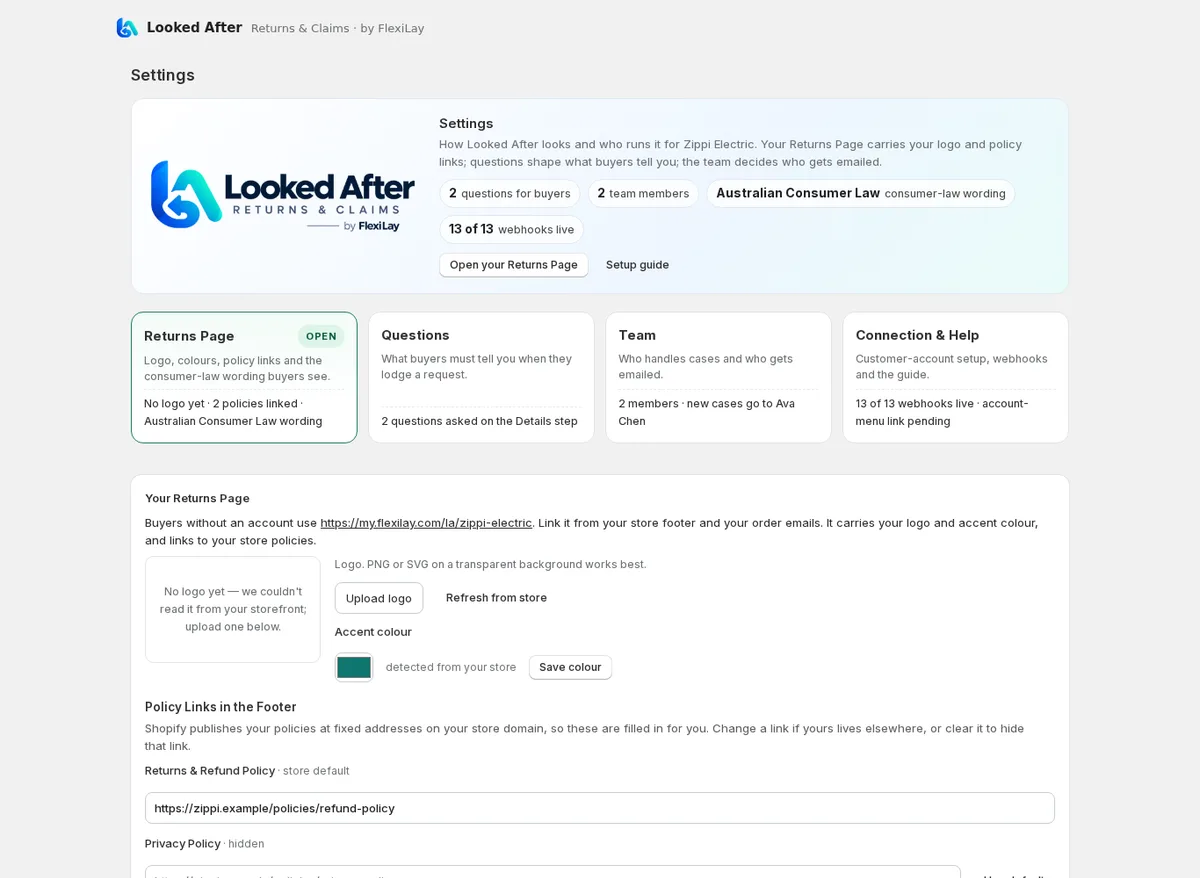
Settings: your Returns Page, questions and team
Settings opens on four cards, each showing its current state and a Needs attention badge where something is unset.
Returns Page
Your logo and accent colour are read from your storefront automatically. If your store is password-protected or the logo isn't picked up, upload one here; PNG or SVG on a transparent background works best. The footer links to your Returns & Refund Policy, Privacy Policy and Terms of Service are filled from Shopify's standard policy addresses; change one if yours lives elsewhere, or clear it to hide the link.
Consumer-law wording follows your store's country: Australia, New Zealand, the UK, the EU, Canada and the US each have specific wording, everywhere else gets a neutral reminder. Buyers see it on the Returns Page and on declined requests; you see the merchant version on each case. Override the country if you sell into another market (Growth and above).
Questions for customers
Add the details you need to assess a request: a serial number, a part number, where it failed. Each question can be short text (letters and numbers), a number, a paragraph or a list to choose from, can be required, and can apply to Returns, Exchanges or Warranty Claims. Buyers answer on the Details step, where “What happened?” is always required, and the answers appear on the case and in your new-request email. Starter includes three questions; Growth and Pro allow up to 50.
Team & notifications
Until you save a team, new cases email your Shopify store email and the store owner, so
nothing is missed on day one. Add staff by name and email, or a shared mailbox such as
warranty@yourstore.com that has no Shopify login (Shopify doesn't let apps read
your staff list). On Growth and above you can route by request type, so Warranty Claims,
Returns and Exchanges land with different people. More in step 8.
Place the button and the “Returns & Warranties” page in customer accounts
This is the one part Shopify leaves to you. Apps cannot add themselves to the customer-account pages or menu; you do it once in the accounts editor and it stays. Allow five minutes.
A. The order button
- In Shopify admin go to Settings → Customer accounts and click Customize. The accounts editor opens.
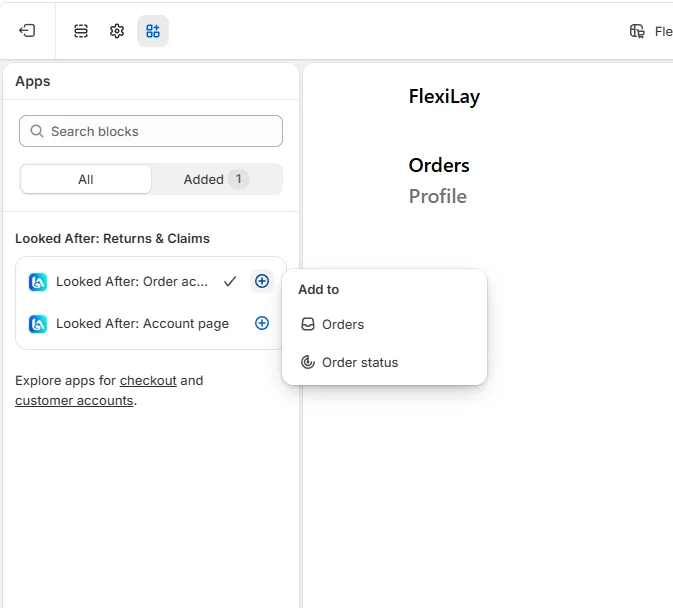
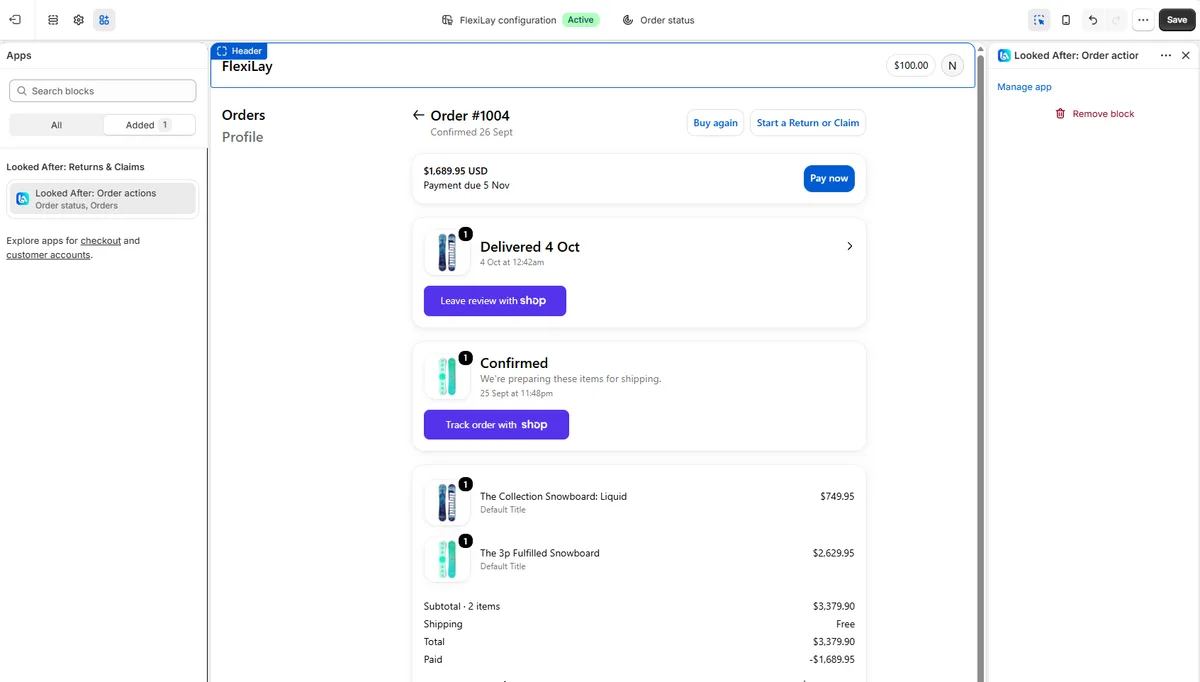
- Open the Apps panel (the puzzle-piece icon). Under Looked After: Returns & Claims click the + next to Order actions and add it to Orders and to Order status.
- The preview shows Start a Return or Claim beside “Buy again”. Save.
B. The Returns & Warranties page
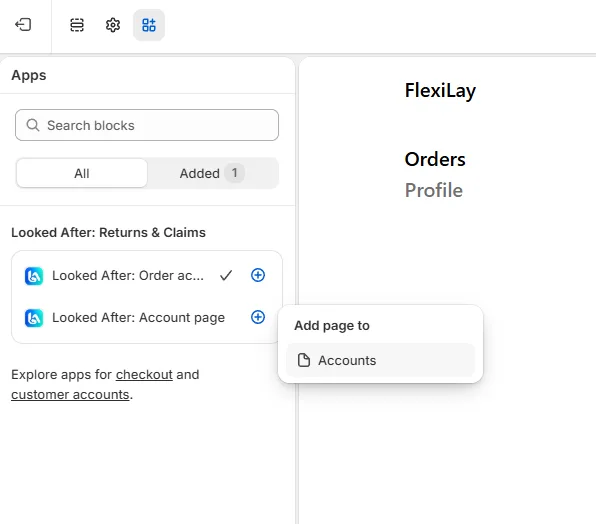
- Still in the Apps panel, click the + next to Account page and choose Add page to Accounts.
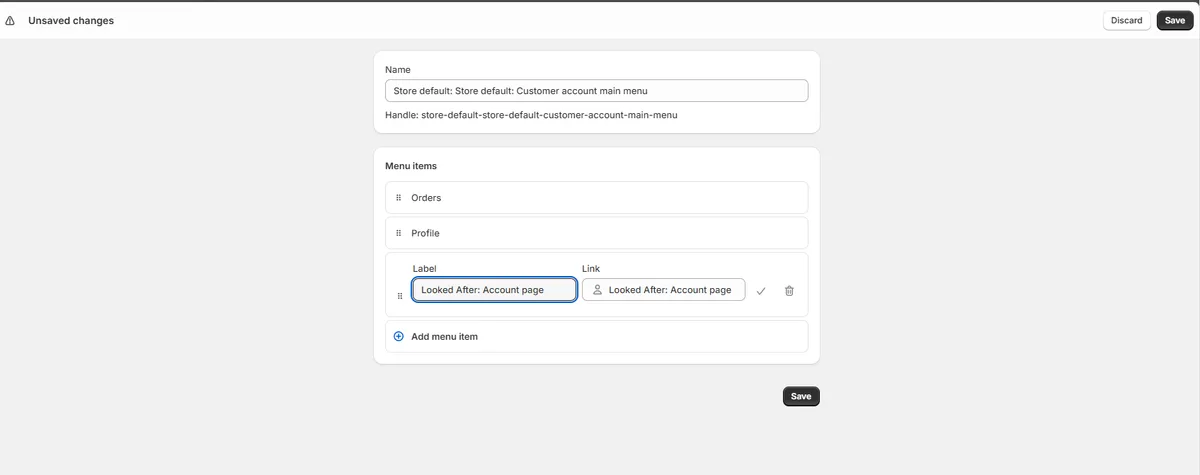
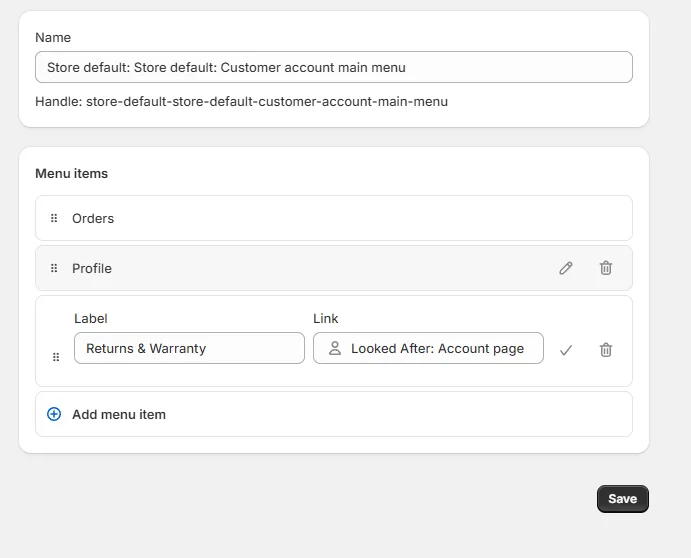
- Shopify asks how customers will reach it: click Add to menu. The customer-account menu editor opens with a new item linked to the page.
- Change the item's Label from “Looked After: Account page” to Returns & Warranties (or whatever your buyers would look for), tick, and Save.
- Back in the editor the link shows in the account navigation. Save the editor too.
- In the app's Overview, click Mark done on that step. It also ticks itself the first time a signed-in buyer opens the page.
What buyers see
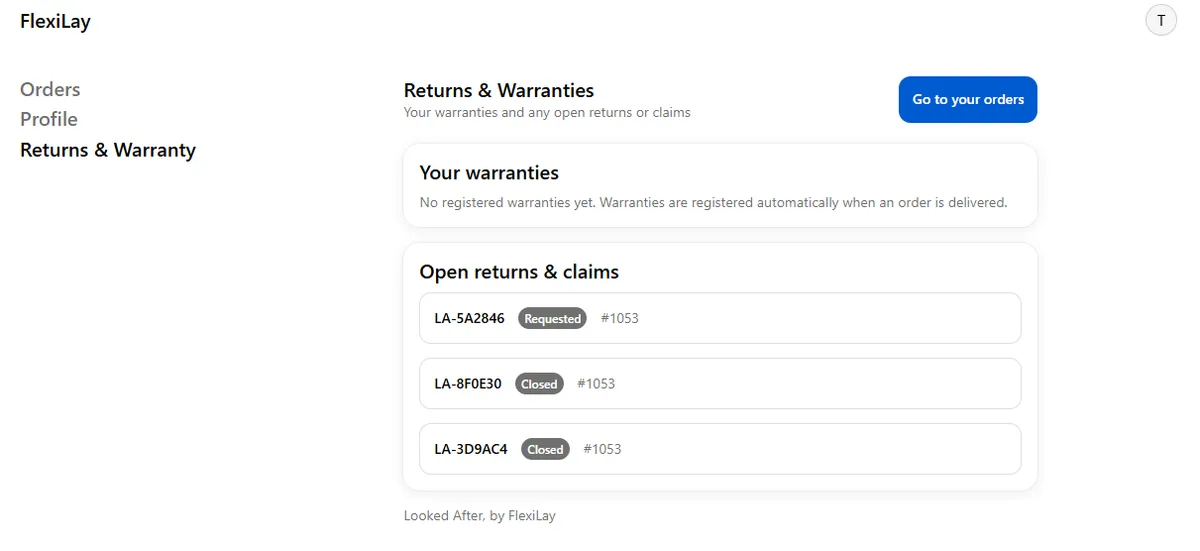
Nothing under Apps? The editor lists only apps installed on this store with a released version. Reinstall Looked After from its listing and reload the editor.
Link your Returns Page, and what buyers see
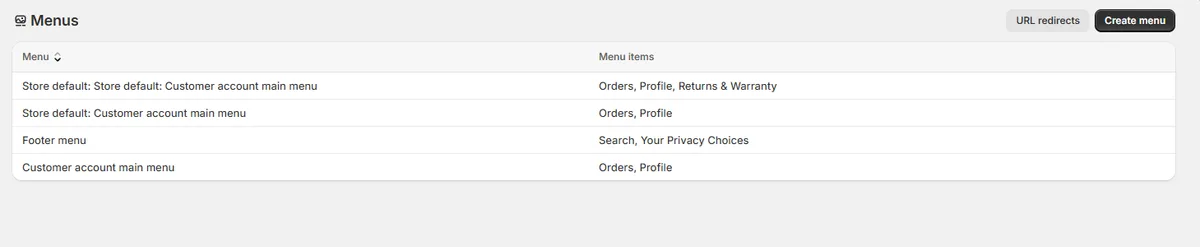
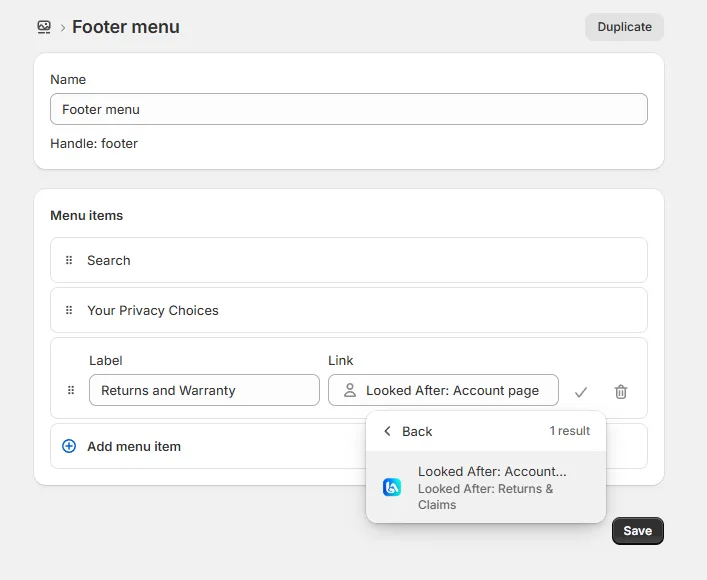
Every store gets a Returns Page (the exact address is on the Overview and in Settings, with a copy button). Add it to your store footer under Content → Menus → Footer menu, and to the order and shipping confirmation emails so buyers can find it when they need it. No account, no password. Two ways to link it from the footer:
- Link to the Returns Page address (paste the URL from the Overview). Works for every buyer, signed in or not.
- Link to the customer-account page: when adding the menu item, search the Link field for “Looked After” and pick Looked After: Account page. Buyers are asked to sign in, then see their cases.
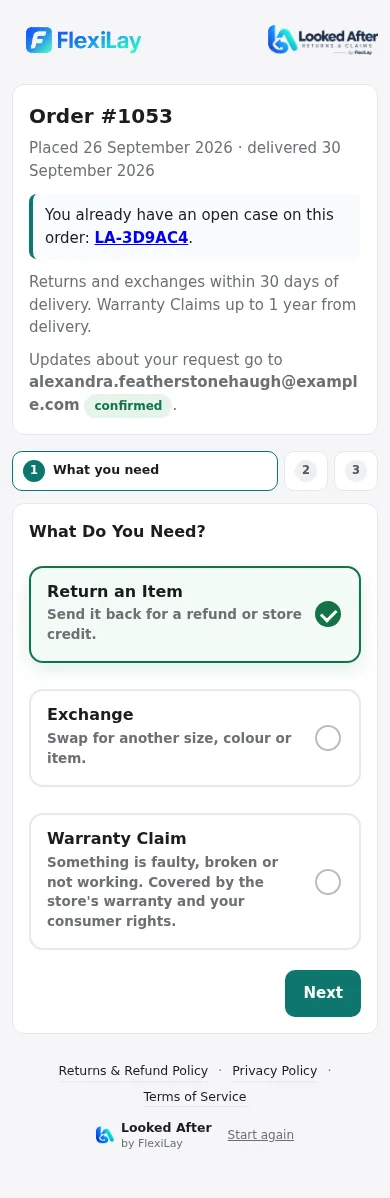
- Look up the order with the order number and the email or mobile used at checkout. A buyer who ordered with only a mobile number is asked for an email address first and confirms it with a 6-digit code, so you always have somewhere to reply.
- What do you need? Three cards: Return an Item, Exchange, Warranty Claim. Each says what happens next; items that cannot be returned yet are still listed, and an Exchange can be asked for before the order ships (“may be able to swap”; it is never promised).
- Items: big tap-to-select cards, each with a reason and quantity, and for Exchanges the size or item wanted.
- Details: “What happened?” (always required, at least a sentence) and your custom questions, then photos.

The buyer's case page shows a dotted progress line for their kind of request, who is handling it (first name and initial), the conversation, your return instructions and label when sent, an “I've posted it” form for carrier and tracking, and the outcome when resolved. Every email to the buyer comes from Looked After with your store name and replies to the right person on your team.
Match your Shopify refund policy, and how the two sync
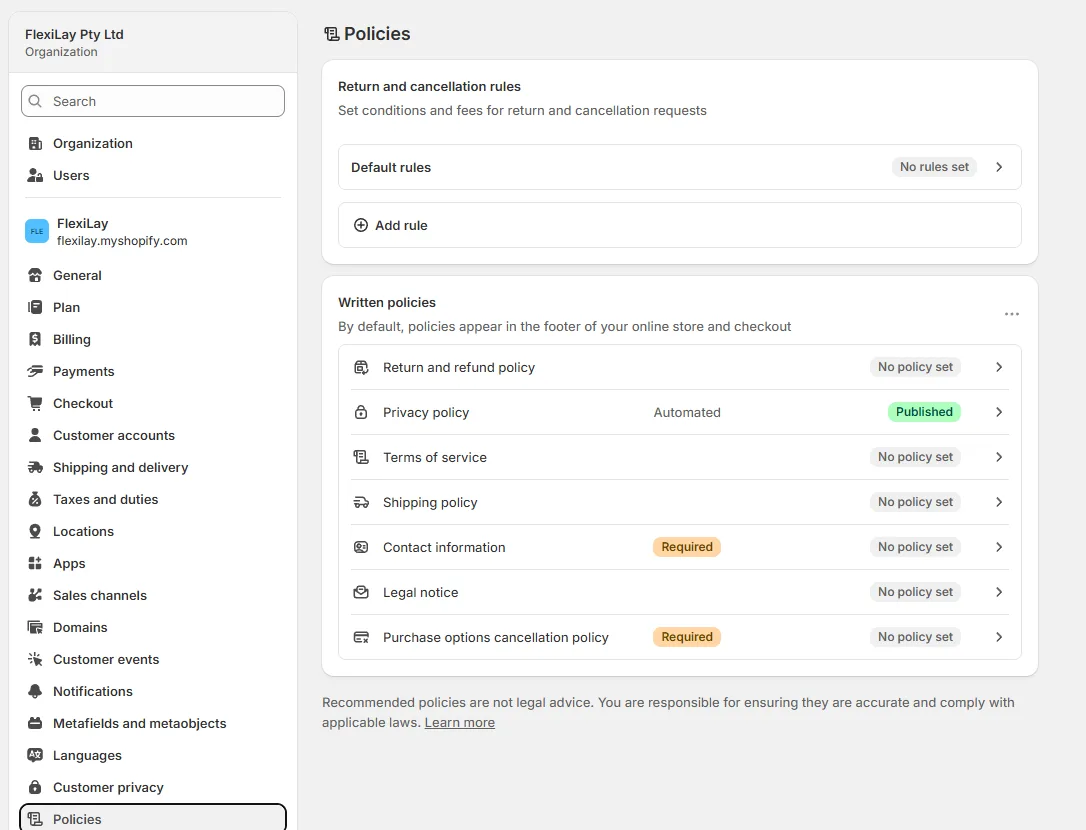
Shopify's own self-serve return request, which it shows to signed-in buyers when it is enabled, reads the refund policy text under Settings → Policies, not the app's rules. Mirror your window there in plain words so both agree.
- A return a buyer raises through Shopify's own flow, or one your staff open in Shopify admin, appears in Looked After as a case too.
- Approving, declining or cancelling in either place updates the other.
- Items received or restocked inside Shopify's return mark the case Received.
- Refunds from a case can put the items back into stock at your location (Growth and above). Stores that installed before this existed see a one-time Re-authorise banner: click it, approve the extra permission, and the banner goes.
Work a case
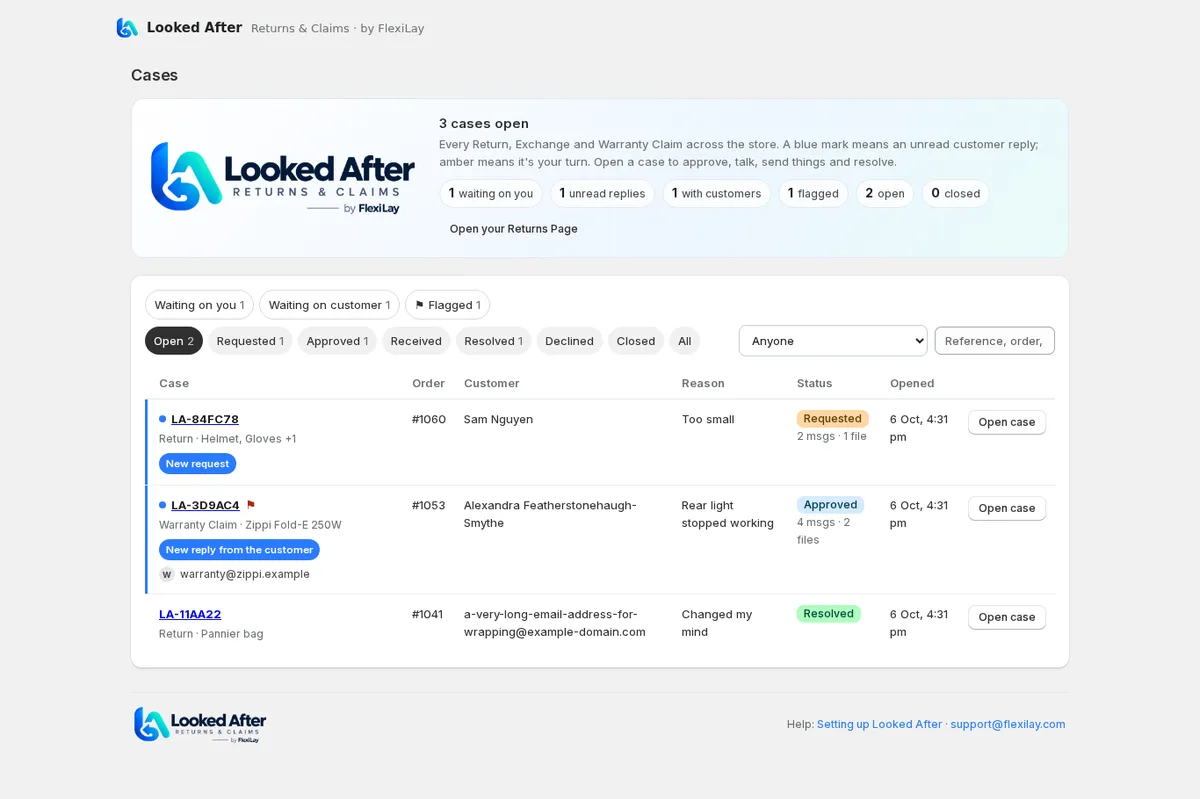
New requests land on the Overview under Needs attention and you get an email. In lists, a blue mark means an unread customer reply and an amber edge means it's your turn; flag a case to keep it in view. Open it to see the items, the buyer's answers and photos, the order link, and the thread.
The Next Step card suggests the one action that moves the case on and explains what it does. The others are a click away under More actions.
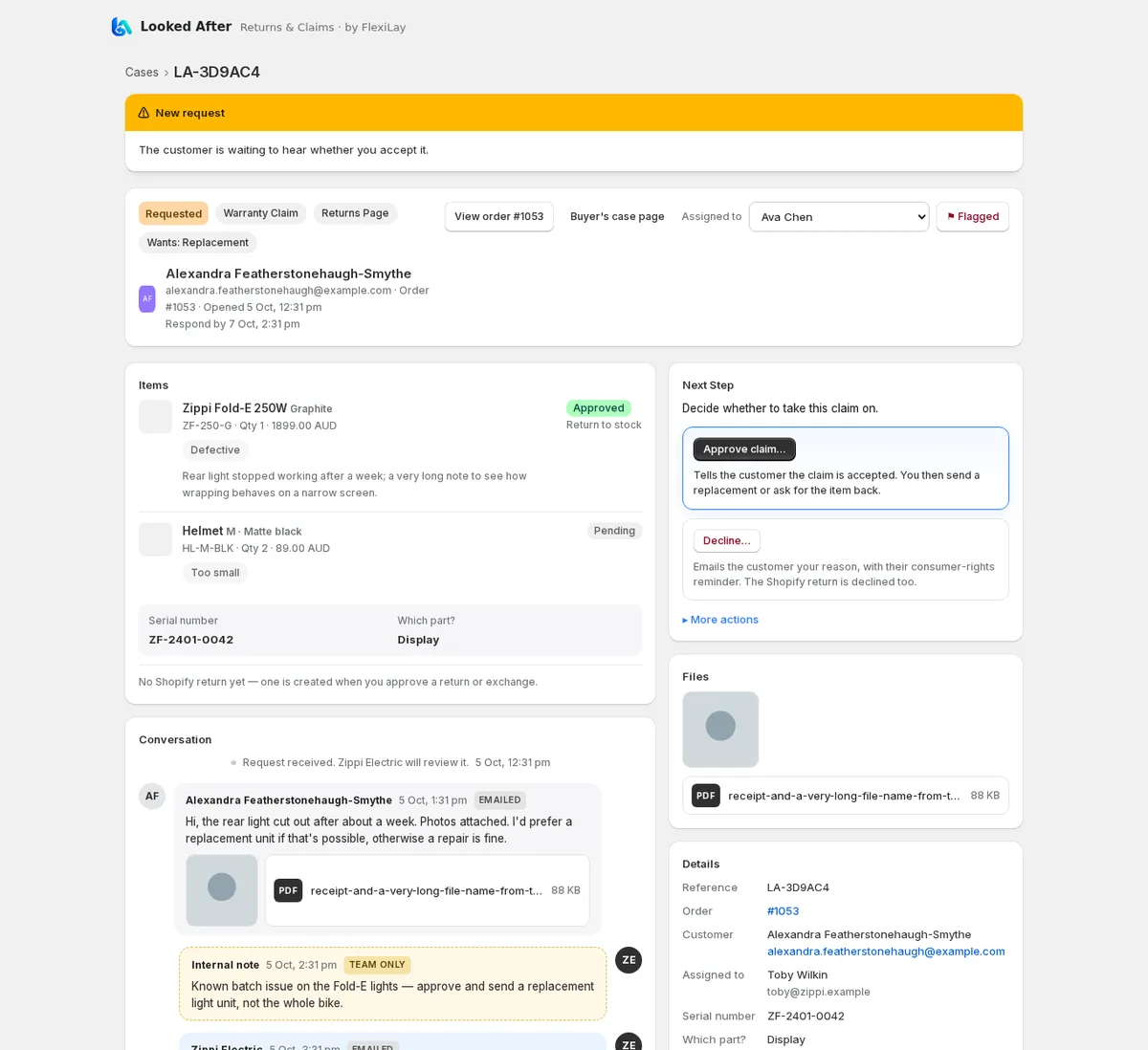
- Approve emails the buyer and, for Returns and Exchanges, opens the return in Shopify. You can send return instructions in the same step: your address, how to pack it, who pays, and a label PDF if you attach one.
- Decline asks for a reason the buyer will see, together with the consumer-rights reminder worded for your store's country.
- Send return instructions and Customer has posted it cover the journey back; buyers can also record carrier and tracking from their case page.
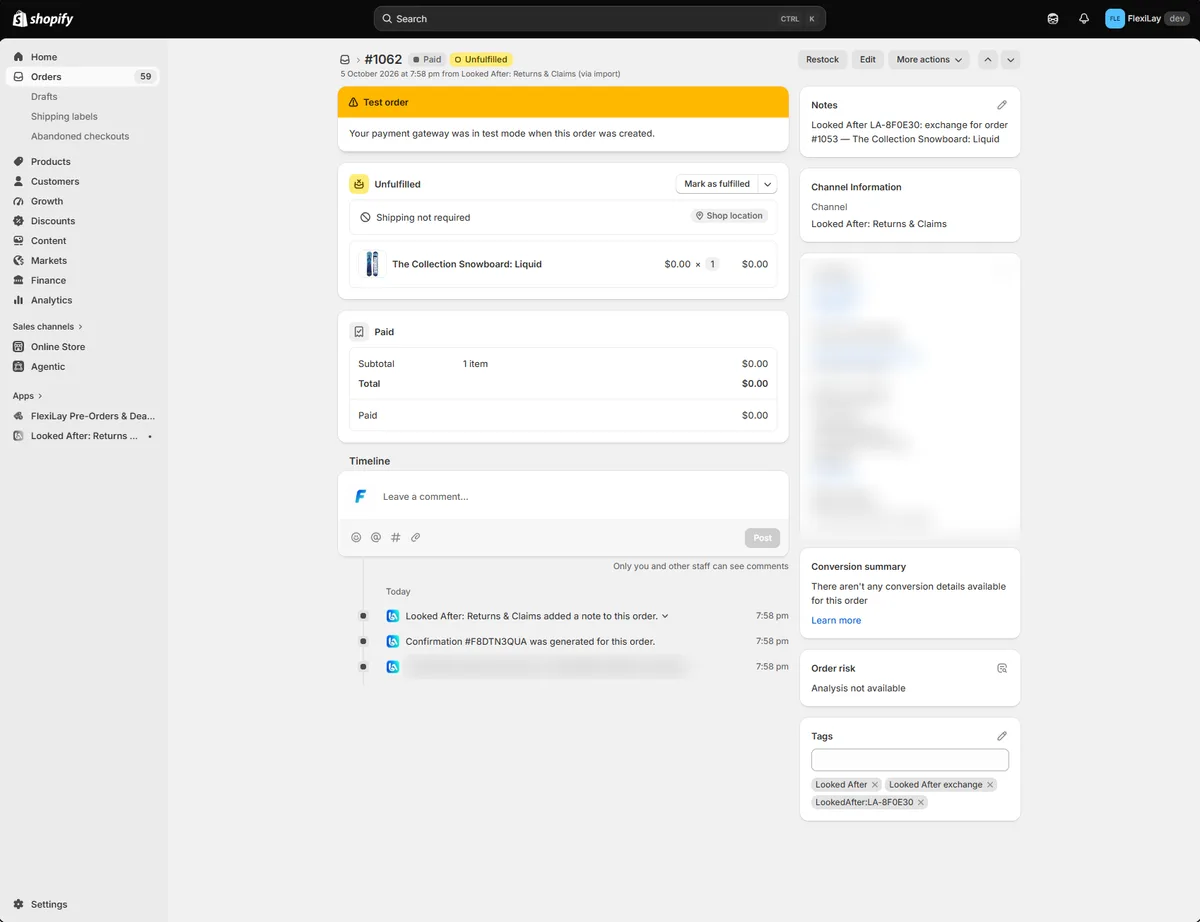
- Send replacement / Send exchange (Growth and above) builds the parcel from your inventory: whole items or just the parts that broke, several at once, or a custom item that isn't in Shopify. It confirms the ship-to address and creates a $0 order in Shopify tagged with the case reference; you fulfil it there as usual.
- Mark received when the parcel arrives.
- Resolve finishes the case: a refund made through Shopify to the original payment method (defaulting to the item value less any restocking fee, with an option to put the items back in stock); store credit issued by Shopify onto the customer's account, with an optional expiry; Exchange Sent, Replacement Sent, Repaired, or no further action. The buyer gets the breakdown by email.
- Reply writes to the buyer; they get an email and can answer from their case page. Tick Internal note for something only your team should see.
- A resolved case closes itself 24 hours later; close it sooner if you like. Cancel ends a request without any money moving.
Refunds always go through Shopify. Looked After never moves money itself, so your Shopify Payments and FlexiLay lay-by records stay the source of truth.
Share the work: team and notifications
Under Settings → Team add the people who handle cases, or a shared mailbox. Then choose where new cases go: one default for everything, with optional overrides so Warranty Claims, Returns and Exchanges land with different people (routing is a Growth feature; Starter includes three team members).
- An assigned case emails only its assignee, and the customer's replies go to that address. Reassign any case from the dropdown in its header.
- Unassigned cases email the notification addresses you list, or your store contact if the list is empty.
- Filter the Cases list by assignee, including Unassigned, to see who has what.
Plans & billing
Every plan starts with a 30-day free trial, approved on Shopify's screen at install. Prices are in USD and appear on your Shopify invoice. The Account tab shows your plan and trial, cases used this month, and the plan cards.
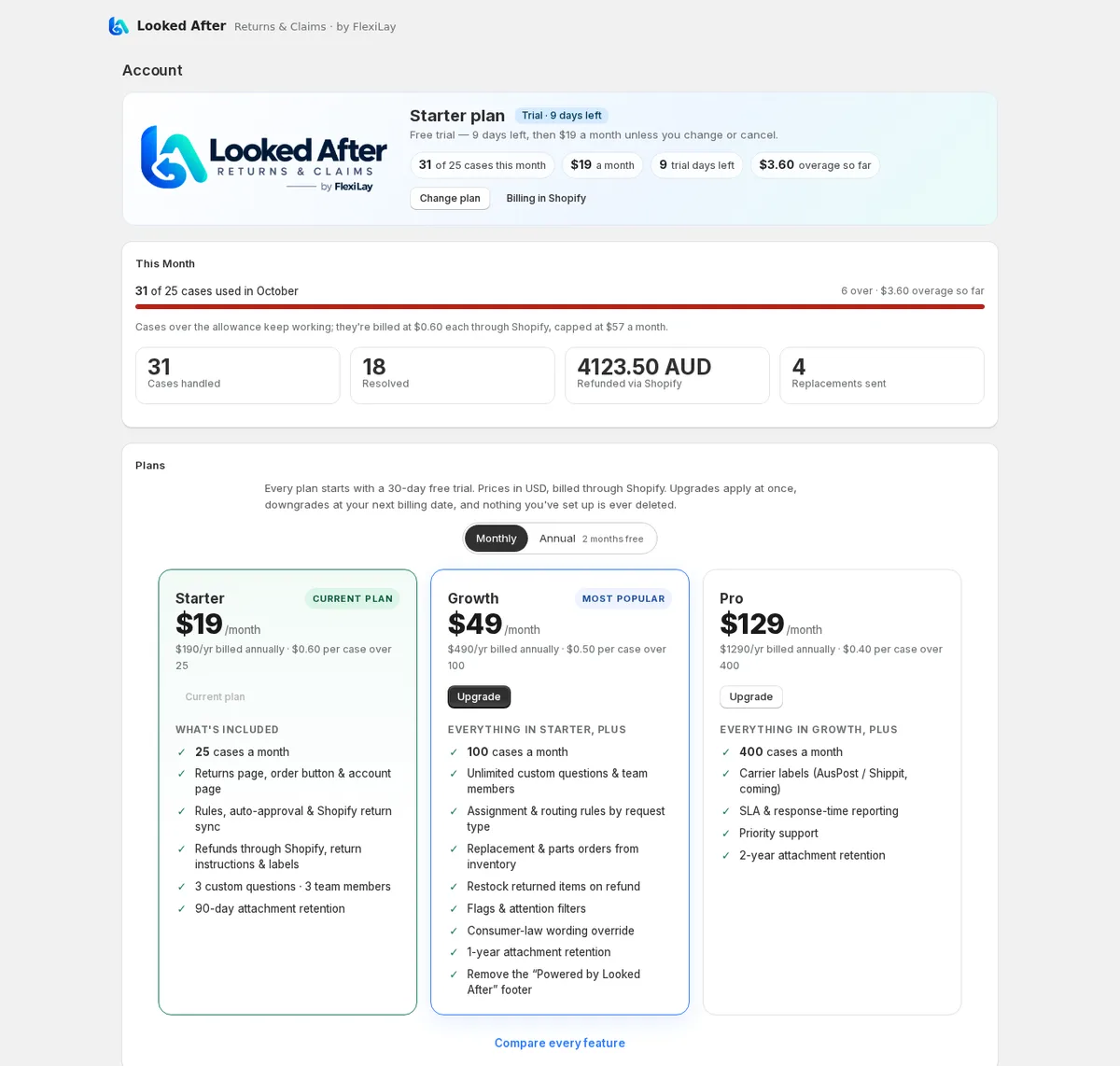
| Starter | Growth | Pro | |
|---|---|---|---|
| Price | US$19 a month · $190 a year | US$49 a month · $490 a year | US$129 a month · $1,290 a year |
| Cases a month | 25 | 100 | 400 |
| Over the allowance (monthly plans) | 60¢ a case | 50¢ a case | 40¢ a case |
| Custom questions · team members | 3 · 3 | Up to 50 · 50 | Up to 50 · 50 |
| Routing rules, replacement & parts orders, restock on refund, flags, law override | — | ✓ | ✓ |
| Carrier labels (coming), SLA reporting, priority support | — | — | ✓ |
| Attachment retention after a case closes | 90 days | 12 months | 24 months |
- A case is one Return, Exchange or Warranty Claim, counted when it is created. Cases beyond your allowance keep working; they are marked Over allowance in your lists and billed per case through Shopify on monthly plans. Annual plans are not metered (two months free, and over-allowance cases cost nothing extra).
- Upgrades apply at once and Shopify prorates; downgrades take effect at your next billing date. Switch between monthly and annual from the same cards.
- Features above your plan stay visible in the app with an Available on Growth note, so you can see what you'd get. Nothing you have set up is ever deleted on a downgrade; only adding more is paused.
- Cancel from the Account tab: you keep your plan until the end of the period you have paid for. After that, or if a trial ends without a plan, buyers can still raise requests and you are still emailed, but the console is read-only until you choose a plan.
- Stores with the FlexiLay lay-by gateway active have Growth included at no charge.
Lay-by orders
A buyer paying off a lay-by through FlexiLay has not received the goods, so a change of mind is a plan cancellation, not a return. The Returns Page says so and points them to you. Once the plan is complete and the order is released, the item is treated like any other delivery, and you can start the return window from the release date in Rules.
Troubleshooting
- “Re-authorise Looked After” banner. The app needs permission to read your locations (so refunds can restock) and to read orders older than 60 days (so warranty claims on last year's orders can be found). Click Re-authorise now, approve, and the banner clears on the next page load.
- A buyer can't find their order. The order number and the email or mobile must match the checkout exactly; the page never says which one was wrong. Ask them to check the order confirmation email.
- No logo on the Returns Page. Password-protected storefronts can't be read; upload the logo under Settings → Returns Page.
- A case says “Over allowance”. It works normally; it's beyond this month's plan allowance and is billed per case (monthly plans). The Account tab shows the count and the next tier.
- “Available on Growth” on a button. That feature is above your plan; everything else on the page still works. Upgrade from the Account tab.
- The console is read-only. Your trial ended or the subscription wasn't approved. Choose a plan on the Account tab; nothing has been deleted.
- Nothing under Apps in the accounts editor. Reinstall Looked After from its listing and reload the editor.
Good to know
- Photos and files are stored by FlexiLay, shared only through time-limited links, kept for your plan's retention window after a case closes, and removed when the case is deleted or the customer asks for their data to be erased.
- Emails to the buyer come from
noreply@lookedafter.flexilay.comwith your store name, and replies go to the case's assignee or your notification address. - Consumer law. Statutory consumer guarantees sit alongside any return window or warranty, never instead of them. Looked After adds wording; it never decides a buyer's legal rights for you.
- Uninstalling cancels the subscription through Shopify and removes the app's access; cases and files are purged when Shopify sends its data-erasure request.
- Pre-Orders & Deadlines and the FlexiLay gateway are separate apps; Looked After works with or without them.
Stuck? support@flexilay.com.